
Monthly manufacturing shift schedule: Excel template
Download a blank shift schedule in XLSX or CSV. Assign people to work areas, record day and night shifts and check open positions before publishing the plan.
Vakhta / People & setup
Describe plants, units, zones and positions, import workers and grant roles with scoped access. Everyone sees only the part of production they run.
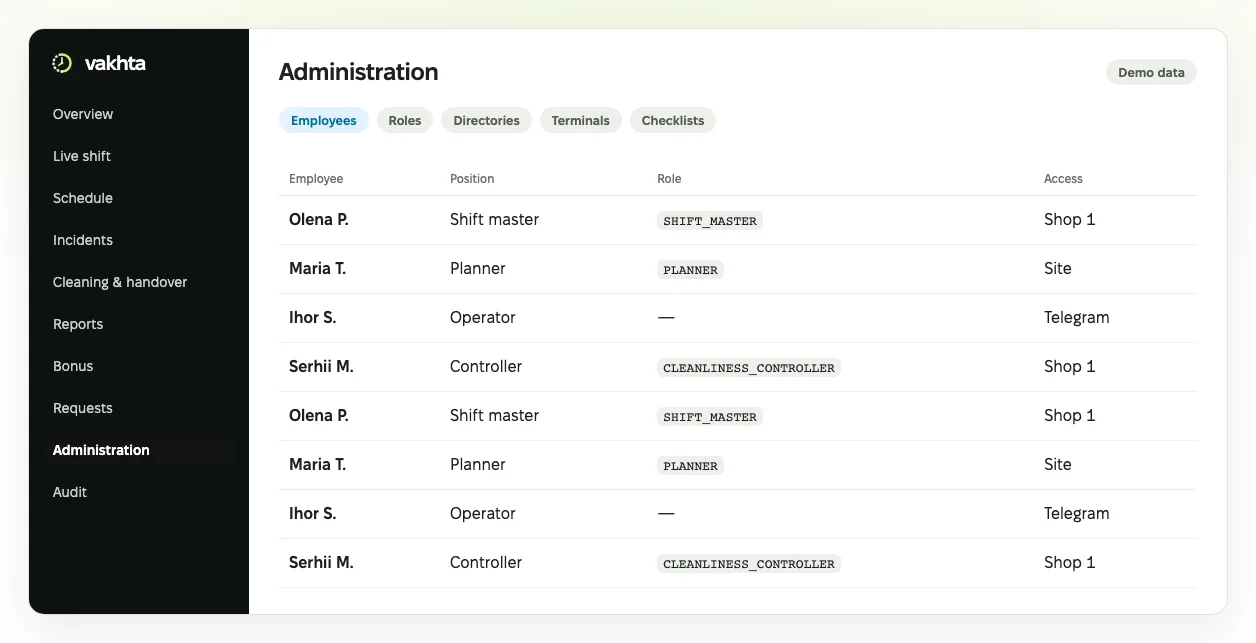
Interface illustration with fictional data. The real interface evolves and may differ.
One structure for schedules, attendance and operational processes.
Book a demoBefore any system goes live at a plant, the same question comes up: who sees what, and who is responsible for what. In Vakhta an administrator describes the structure: plants with their time zone, units, teams, positions, zones and downtime reasons.
Workers are added by hand or imported from a CSV file. Each receives an activation code to link Telegram; workers need no account or password. Kiosk tablets at the gate are paired with a one-time code from the panel. Each unit can have its own shift times, for example 8 or 12 hours.
Panel roles match real duties: administrator, production head, HR, planner, shift supervisor, cleanliness controller, accountant and auditor. Each role has a scope: enterprise, plant, unit, team or zone. A supervisor in one shop does not see other shops.
The menu shows only permitted sections. Deleting requires a reason: an employee card with history is not erased but marked as terminated, so its records stay in reports. Supervisors, HR and planners all work in one panel, with no separate programs.
Start with one plant and one unit. Check that each panel user sees exactly what their job needs and nothing more: ask a supervisor, HR and a planner to walk through their daily actions.
Measure how long it takes from the employee list to the first QR check-ins, how many workers linked Telegram and where questions came up about activation codes or pairing a terminal.
Also check the structure tree: is every worker in the right unit, and does every unit have an assigned supervisor?
Vakhta does not integrate with ERP, MES, HR systems or access control: employee data is entered in the panel or imported from CSV. Panel sign-in uses email and password, with optional two-factor verification.
To launch, prepare an employee list with personnel numbers, the structure of units and zones, positions, shift times and the people who need panel access, together with their roles. One import takes up to a thousand rows and shows errors before saving.
Choose one process, agree who is responsible and evaluate changes using recorded facts.
Download a blank shift schedule in XLSX or CSV. Assign people to work areas, record day and night shifts and check open positions before publishing the plan.
Agree what the incoming shift needs to know about an area, its condition and unresolved questions. Download and adapt this template to your process.
Separate what happened from an assumption about its cause. Use this log to discuss recurring obstacles with the shift supervisor.
Working time accounting in manufacturing with 12-hour shifts: planned vs actual hours, night work, breaks, overtime and the timesheet. A worked week and a template.